

01 / FIND
Every chat.
One search.
Search titles and full messages across all four AIs. Filter by platform, date or who said it.
FULL-TEXT SEARCH · FREE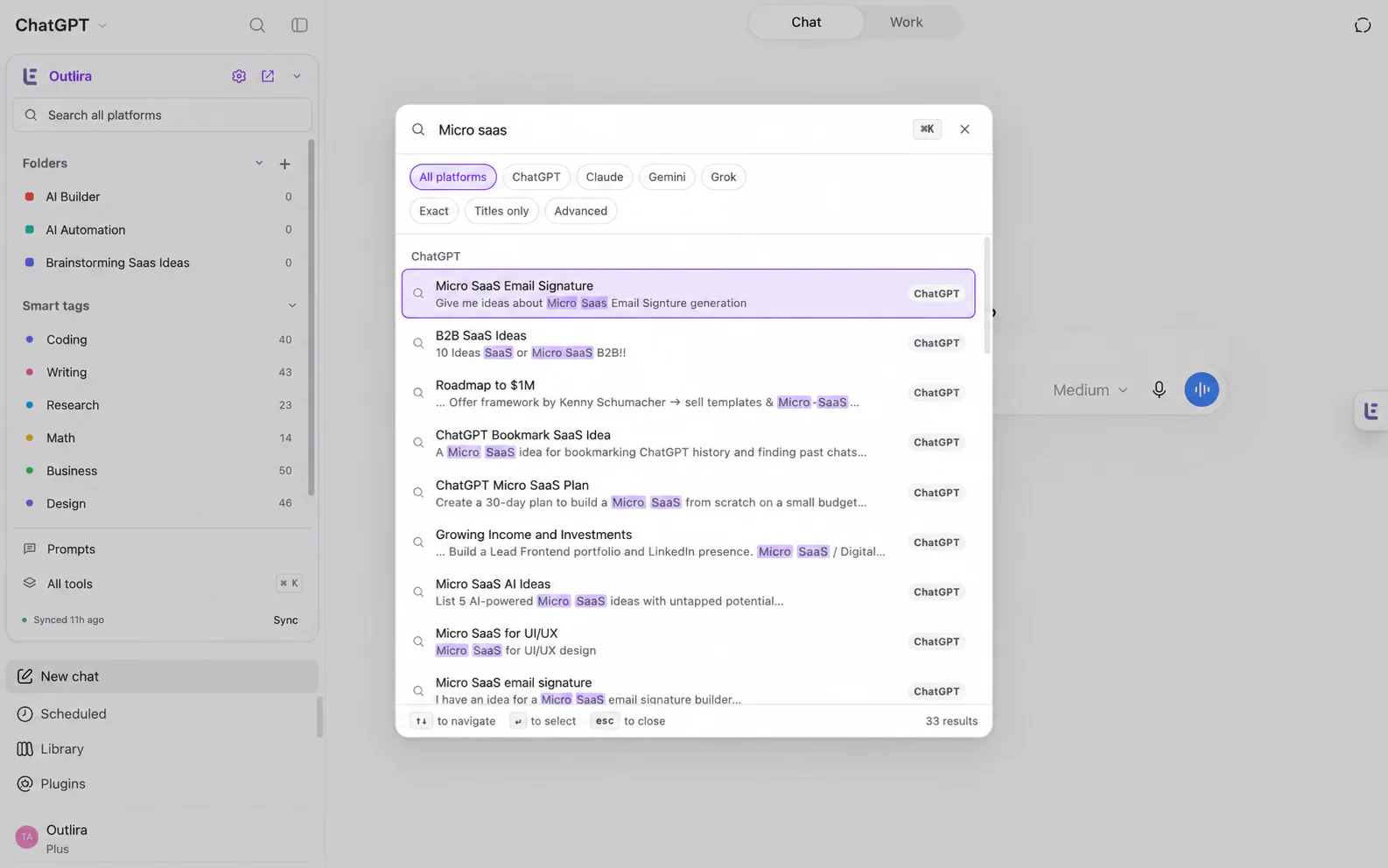
Works on ChatGPT, Claude, Gemini and Grok
Search, organize and reuse conversations across ChatGPT, Claude, Gemini and Grok. Outlira brings your tools into the AI sites you already use.
Free plan · Local tools without an account · Built for four AIs
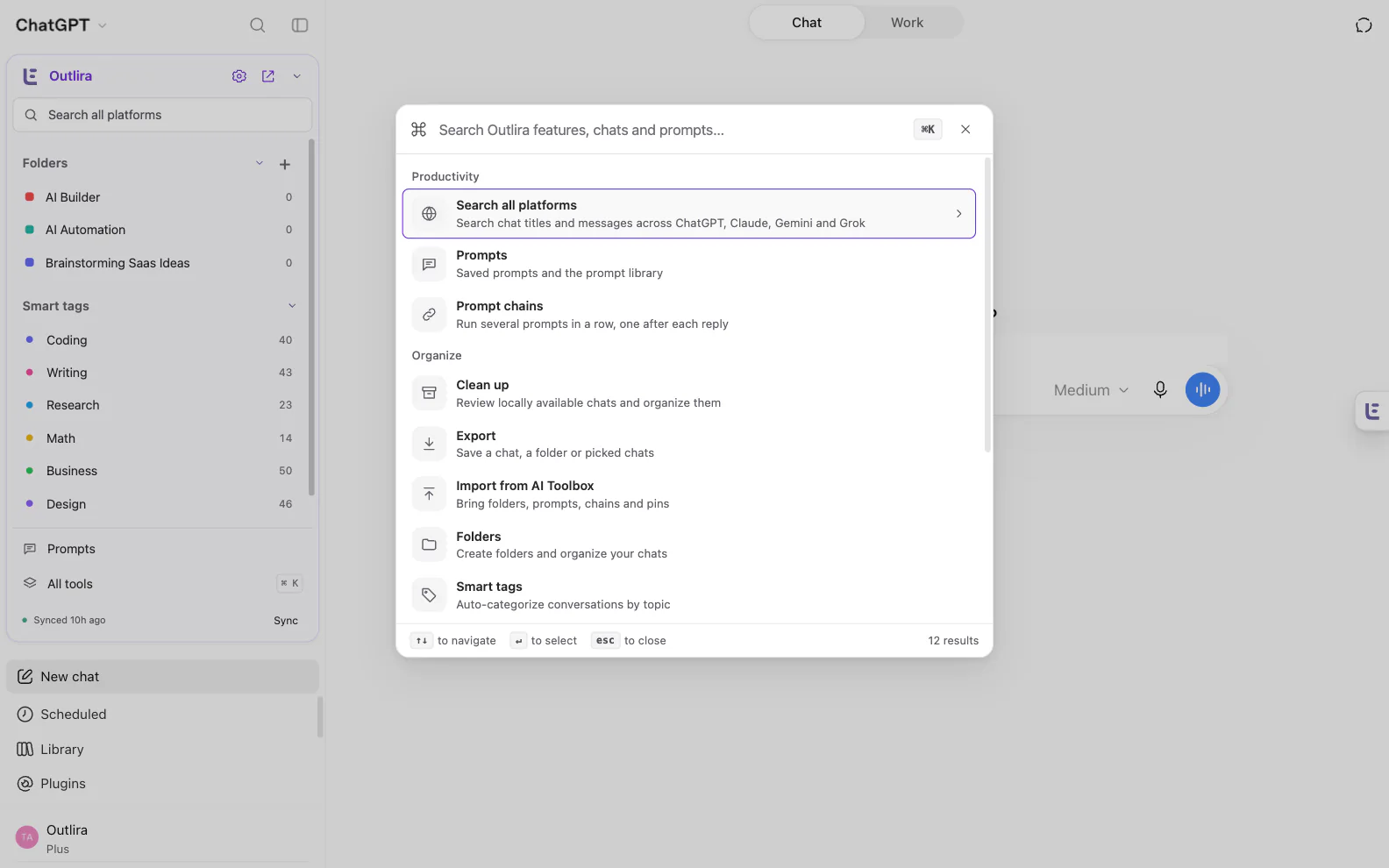
Works with
 ChatGPT


THE WORKSPACE
Find answers, give projects a little structure and keep useful conversations moving. One toolkit, inside your AI sites.
01 / FIND
Search titles and full messages across all four AIs. Filter by platform, date or who said it.
FULL-TEXT SEARCH · FREE02 / ORGANIZE
Unlimited folders and subfolders, colors and pins. Make the structure yours.
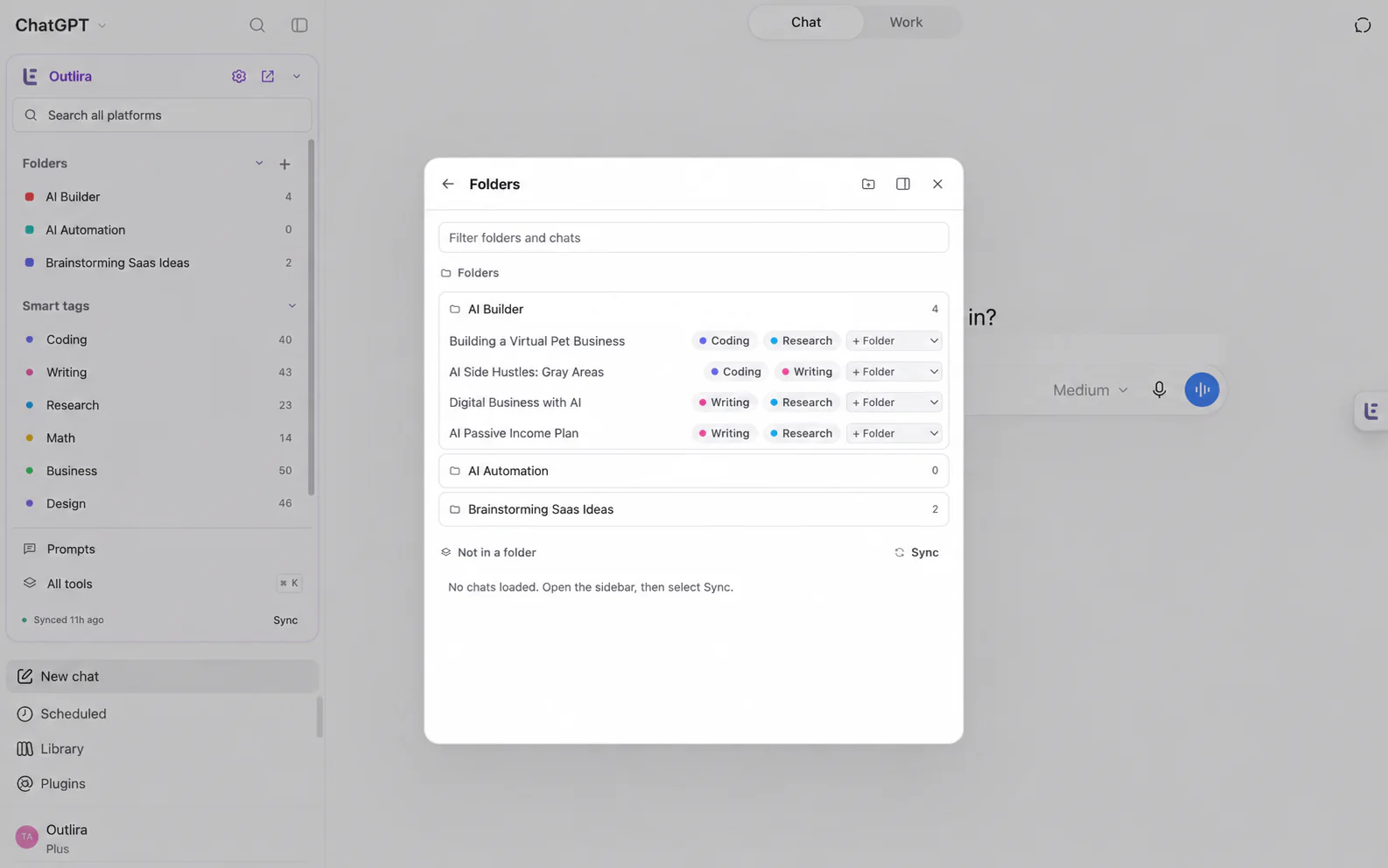
03 / KEEP IT TIDY
Six built-in categories, plus your own rules. Unlimited auto-tagged chats.
Add rules that match the way you work.04 / TAKE IT WITH YOU
Text, Markdown and JSON on Free. Pro adds PDF, Word, and folder or bulk exports.
KEEP · EDIT · SHARE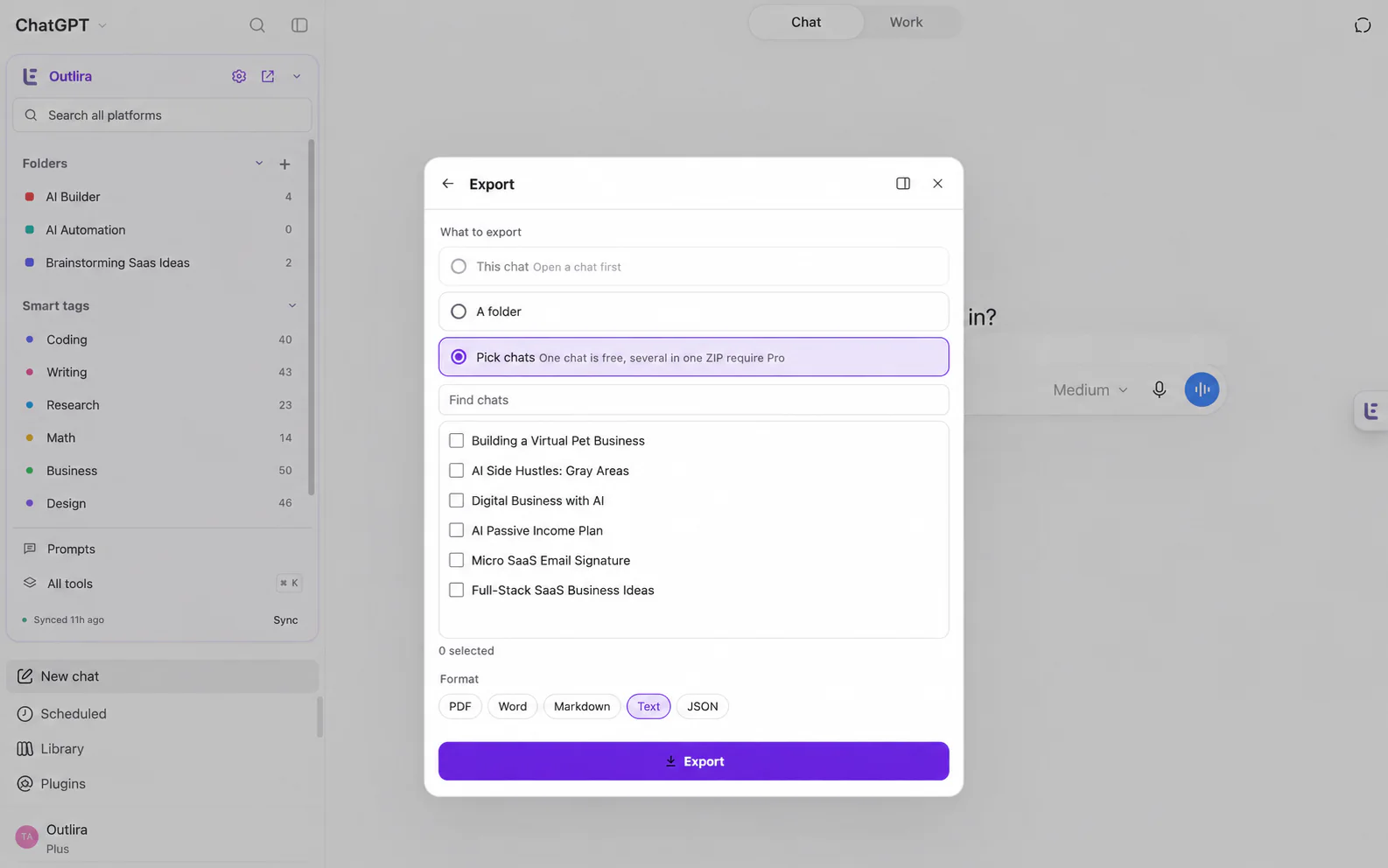
LESS RETYPING. MORE MOMENTUM.
Save the starting points that work. Bring them into your next conversation without leaving the composer.
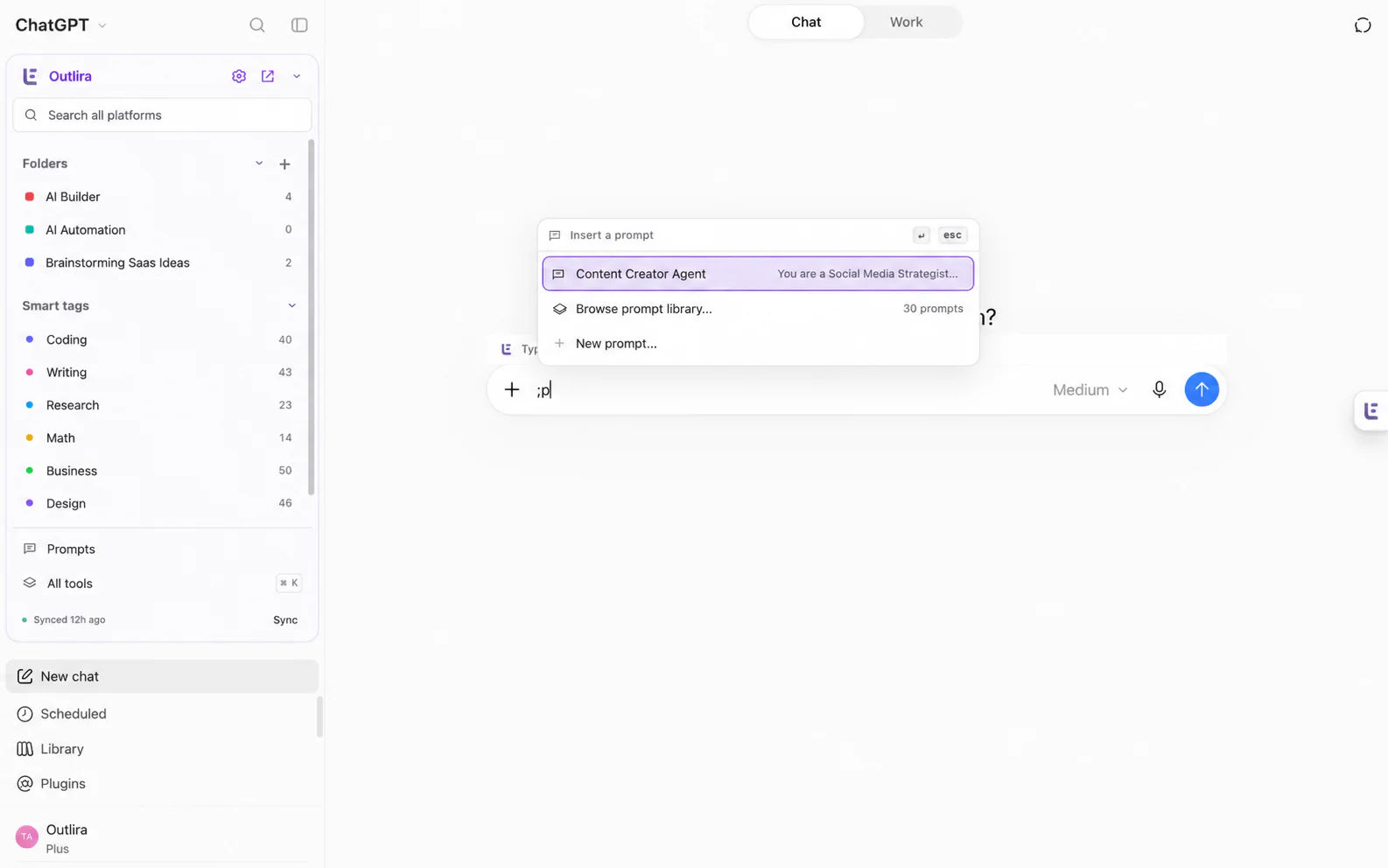
Your prompts, the built-in library and fields like {{topic}}. Unlimited saves on every plan.
Run prompts in order. Each step starts after the previous reply finishes, with progress as it runs.
Reference a past chat in your next message. Sign in; Pro also supports context from another AI.
Light and dark themes follow your system. Your tools stay familiar on every AI.

A command palette for tools, chats and prompts.

Quick access adapts to the tools you open.

Center dialogs, dock them or move the panel.

Keep long threads compact. Expand when needed.

Index opened chats. Sync history when needed.

Handle multiple conversations on either plan.
SET UP YOUR WORKSPACE
Start with the AI sites you already use. Outlira adds the tools around your conversations.
Install Outlira in Chrome and open your AI.
Use Sync all chats to save conversations locally.
Create a folder, save a prompt and start searching.
 YOUR DATA, YOUR CHOICE
Conversations and the full-text index stay local. AI sign-in credentials are not part of cloud sync.
 Only when you enable Pro sync
Folders, prompts, chains, custom rules and pins can follow you across browsers.
FREE TO START. ROOM TO GROW.
Keep the essentials unlimited. Pro opens up bigger workflows and optional sync across browsers.
Swipe to compare Free and Pro →
Your workspace, your pace.Choose the limits that fit your workflow. | Free · $0 Forever. No card needed. | Outlira Pro Monthly or yearly · price shown at checkout |
|---|---|---|
| Prompt chains | 2 | Unlimited |
| Steps per chain | 10 | 30 |
| Custom smart tag rules | 5 | 50 |
| Pinned chats | 5 | Unlimited |
| Past-chat mentions per day | 20 | Unlimited |
| Past-chat mentions per message | 1 | Unlimited |
| Context from another AI | Same-AI context only | All four AIs |
| Single-chat exports | Text · Markdown · JSON | Text · Markdown · JSON · PDF · Word |
| Folder and bulk exports | — | Included · ZIP exports |
| Sync across browsers | — | Optional · enable it in Account |
| Start free. Upgrade when it helps. One account, all four AI platforms. |
;h requires sign-in. The Free allowance is 20 references per account/day across all AIs and browsers, resetting at 00:00 UTC.
Need a hand? Explore Guides & Help in Outlira or contact us.
Outlira adds folders, pins, full-text search, saved prompts, prompt chains, smart tags, context mentions, exports and bulk actions to ChatGPT, Claude, Gemini and Grok. Use it inside your AI sites, with local chat storage and optional Pro sync for your Outlira workspace.
Outlira works with ChatGPT, Claude, Gemini and Grok in Chrome. Your folders stay organized by platform, and full-text search helps you find saved conversations across all four.
You can use local tools, including folders, search and saved prompts, without an Outlira account. Sign in to use past-chat context mentions, manage a Pro subscription or enable optional workspace sync.
Add Outlira to Chrome, then open ChatGPT, Claude, Gemini or Grok. Open the sidebar to find Outlira. Sync your history, create a folder and save your first prompt.
Type ;p in your AI message box to insert a saved prompt, ;c to run a prompt chain, or ;h to add a past chat as context. Prompt chains run each step after the previous reply finishes. Context mentions require sign-in.
Pro gives you unlimited prompt chains and pins, up to 30 steps per chain, 50 custom tag rules and unlimited context mentions across AIs. It also adds PDF and Word exports, bulk exports and optional workspace sync between browsers. Your indexed conversation transcripts stay local.
Search and organize all four AIs for free. Upgrade when your workflow needs more.